
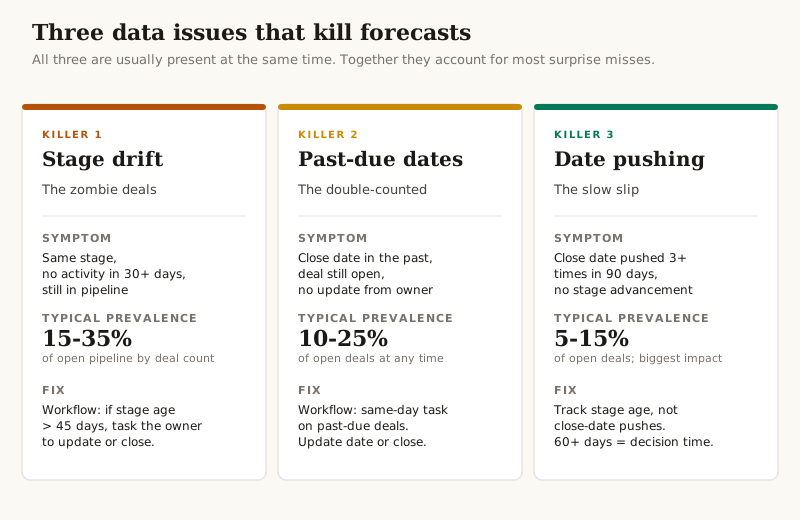
The median B2B SaaS company forecasts within 70-79% of actual. That means most quarters end in a "surprise" — a miss or an overshoot that nobody can explain in real time. The board hears about it on a Thursday call. The VP Sales blames the reps. The reps blame the market. Nobody fixes it before the next quarter.
The reps usually aren't the problem. The data is.
I'll caveat that immediately: yes, some teams have genuine sales execution issues. Yes, some reps sandbag and some over-commit. But before you can diagnose any of that, you need a forecast number you can trust. And in most £2-15M ARR portals I audit, three specific data problems contaminate every forecast — silently, repeatedly, and severely enough that they swamp whatever the reps are actually doing.
This piece walks through those three. How to find them in your portal. How to fix them. And how to spot the difference between a forecast problem and a sales problem — which matters, because the fixes look very different.
Forecast accuracy isn't a sales problem
Most "forecast misses" get framed as bad rep judgement. The fix is more pipeline reviews, more discipline, more commit-call accuracy. None of that works if the underlying data is wrong, because every commit call is reading off the same contaminated source.
The structural issues I see most often:
- Stage drift. Deals sit in the same stage for weeks with no activity. They're still in the forecast because nobody explicitly moved them to closed-lost.
- Close-date theatre. Reps push close dates forward when deals slip. Each push is small. Aggregated, the close-date distribution looks healthy when it shouldn't.
- Forecast category vs. stage probability misalignment. A rep marks a deal "commit" on a 10%-probability stage. The weighted forecast catches this; the rolled-up commit number doesn't.
Each of these is fixable in HubSpot in a few hours of dedicated work. None of them require a process change, more training, or better reps. They require workflows, filters and a forecast review that looks at the right numbers.
Cause #1 — Stage drift (the zombies)
A deal enters discovery. Two weeks of conversation. Then nothing. No emails, no meetings, no notes. The deal still sits in the pipeline at "Discovery" stage with the original close date intact.
This is the most common forecast contaminant in HubSpot. Deals that should have been moved to closed-lost (or at minimum demoted to a lower stage) sit in the pipeline indefinitely because there's no automation forcing the decision and no rep has incentive to write the deal off voluntarily.
How to find it: open the deals view, filter by deal stage age greater than 30 days, status = open. Count the result. In most portals it's between 15% and 35% of total open pipeline by deal count.
Why it matters: every one of those deals counts in the rolled-up forecast number until somebody manually closes it. The weighted forecast partially accounts for this through stage probability, but the at-risk and pipeline numbers don't. If 25% of your open pipeline is stagnant, your forecast is reading off a denominator that's 25% too big.
The fix in HubSpot:
- Bulk-review the stagnant deals manually first. Sort by amount, descending. For each one, the rep or sales leader makes a decision: real and worth pursuing (update with current state), or move to closed-lost.
- Build a workflow: if deal stage age is greater than 45 days AND deal stage is not "Closed Won" or "Closed Lost", create a task for the deal owner: "Decision needed: update or close." Auto-assigned, due in 3 days.
- Add a dashboard widget showing stagnant deal count over time. The number should hover under 10% of open deals if the workflow is working.
Don't try to automate the close-lost decision itself — that's a sales judgement, not a system one. The system's job is to force the decision, not make it.
Cause #2 — Past-due close dates
A deal's close date is set to 30 April. May arrives. The deal hasn't closed and the close date is still 30 April. It sits there for three more weeks before anybody updates it.
The deal is now counting in the at-risk pipeline (because the close date is past), inflating the "deals likely to slip" number, and distorting both the current-quarter and next-quarter forecast.
How to find it: filter open deals where close date is less than today. Count the result.
Why it matters: past-due close dates are double-counted. The deal is in this quarter's forecast (because the close date is still in the quarter that just ended) AND in the at-risk number (because it's overdue). The forecast says "this should have closed last week" while the reality is the deal probably won't close for another six weeks. The CFO sees a healthier at-risk number than reality and gets blindsided.
The fix in HubSpot:
- Filter the past-due deals. Bulk-update by sending each rep a list of their own past-due deals and giving them 48 hours to either move the date forward (with a note) or close the deal.
- Build a workflow: if close date is in the past AND deal stage is not "Closed Won" or "Closed Lost", create a task for the deal owner the same day: "Past due — update or close." Auto-assigned, due same day.
- Adjust the rep's pipeline dashboard to show count of past-due deals. Make it a metric they look at every Monday.
The hardest part of this fix isn't the workflow; it's the cultural one. Reps avoid updating close dates because each update is a small admission that the deal slipped. The workflow makes the admission unavoidable. That's the point.
The free PineRiverData CRM audit measures all three of these forecast contaminants against your live HubSpot portal and quantifies the impact in annual revenue. Takes 90 seconds. Read-only OAuth.
Cause #3 — Close-date manipulation
A rep has a deal with close date 30 April. On 28 April, they push it to 15 May. On 13 May, they push it to 30 May. On 28 May, they push it to 15 June. Each push is technically a legitimate update. Aggregated across the pipeline, it's a pattern that completely breaks the forecast.
This is the hardest of the three to spot because each individual update looks reasonable. The pattern only emerges when you look at property history across multiple deals.
How to find it: in HubSpot, open the deal pipeline view. Add the "Date last modified" column. Filter to deals where close date has been modified three or more times in the last 90 days. Cross-reference with deal stage — if the stage hasn't moved in the same period, the deal is being kept alive on paper without real progression.
Why it matters: these deals are functionally dead but counted as live. They distort win-rate calculations (the deal hasn't closed-lost yet so it isn't in the denominator). They distort sales cycle length (the deal age keeps growing). They distort weighted forecast (because stage hasn't moved, stage probability hasn't dropped). And they make every cohort-based analysis less reliable.
The fix in HubSpot:
- Build a custom property: "Close date push count." Set it via workflow: each time close date is modified, increment by 1.
- Build a second workflow: if "Close date push count" reaches 3 AND deal stage hasn't advanced in 90 days, create a task: "Decision required: real or close out?" with a 5-day deadline.
- Run the audit query monthly. Treat any deal with 3+ close-date pushes as a flag for the next pipeline review.
The cleanest version of this fix removes the close-date push count entirely and replaces it with a different metric: stage age. If a deal has been in the same stage for 60+ days, it doesn't matter how many times close date has been pushed — the deal isn't progressing and needs a decision. Track stage age, not close-date pushes, and the same problem becomes more visible.
The "weighted vs. raw" trap
Most HubSpot users have one of three forecast views configured: raw pipeline (sum of all open deal amounts), weighted pipeline (each deal × stage probability), or forecast categories (commit + best case + pipeline). The reliable signal lives in agreement between all three.
The trap: HubSpot's default stage probabilities are templates. They're set when you first configure the pipeline, often based on assumptions about your conversion rates that haven't been validated against your actual data. If your "Discovery" stage shows a 20% probability but historical conversion from Discovery to Closed Won is actually 8%, your weighted forecast is overcounting by more than 2x for every deal at that stage.
The fix: every quarter, recalibrate stage probabilities against your last 12 months of closed deals. The calculation is straightforward:
- For each stage, count deals that entered that stage in the last 12 months
- Of those, count how many ended at Closed Won
- The ratio is your real stage probability
If your defaults are wrong, weighted forecast is wrong. If weighted forecast is wrong, the entire CFO-facing number is wrong. This calibration is the highest-leverage thing you can do in a single afternoon.
Forecast Confidence Index
Once the three contaminants are addressed and the stage probabilities are calibrated, the next step is monitoring. Build a single forecast confidence number that combines:
- Percentage of pipeline with stage age under 30 days (target: 85%+)
- Percentage of pipeline with close dates in the future (target: 95%+)
- Percentage of pipeline with no close-date pushes in 90 days (target: 90%+)
- Stage probability calibration freshness (target: recalibrated in last 90 days)
Roll these into a single 0-100 confidence index. Track it weekly. If the index drops below 75, the forecast number isn't reliable and the conversation in the QBR should be about why the data is degrading, not why the deals didn't close.
The 30-day fix sequence
If you have one month to fix this:
- Week 1: Audit. Run the three queries above. Quantify how many deals fall into each bucket and what % of total pipeline they represent.
- Week 2: Fix the stagnant deals manually. Move the obvious closed-lost candidates. Update the ones that are real. Build the stage-age workflow.
- Week 3: Fix the past-due dates. Build the past-due workflow. Update reps' dashboards to show their own past-due deals.
- Week 4: Recalibrate stage probabilities. Build the close-date push tracking workflow. Set up the confidence index dashboard.
After 30 days, forecast accuracy at most £2-15M ARR portals lifts by 10-20 percentage points. Not because the reps got better. Because the data they were reading off finally matches reality.
What this isn't
This piece is about CRM data integrity, not sales coaching. If your reps are systematically sandbagging or over-committing, the fixes above will surface the pattern (because the data will finally agree with reality) but won't change the underlying behaviour. That's a coaching conversation, and a separate one.
The order matters. Fix the data first. Then look at the rep-level patterns the clean data reveals. Most "rep performance issues" disappear once the data is right — they were ghosts in the system, not real underperformance.
If forecast accuracy is the most visible symptom, the broader methodology for diagnosing CRM health lives in the five-category CRM audit methodology — Forecast Reliability is the highest-weighted of the five categories at 25%, precisely because forecast errors compound faster than any other data quality issue. And if you're at the decision point of whether to hire someone to fix this, the framework lives in When B2B SaaS Should Hire Fractional RevOps.

Frequently asked questions
Why is my sales forecast always wrong?
Forecast accuracy is rarely a sales execution problem. The actual cause is usually three specific data issues in your CRM: deals stagnant in stage with no movement (zombies still counted in pipeline), open deals past their close date (inflating the at-risk number), and serial close-date manipulation where reps keep pushing the date forward without advancing the stage. Together these account for most surprise misses at quarter-end. Fix the data first; review the reps second.
What's a healthy SaaS forecast accuracy?
Median B2B SaaS forecast accuracy lands between 70% and 79% — meaning the typical SaaS company misses or overshoots their forecast by 20-30% each quarter. Healthy companies operate at 85% or above. Anything below 70% indicates structural data problems, not bad rep judgement. The number you actually want to track weekly is the gap between weighted pipeline coverage and what closed — not the rep-by-rep commit calls.
How do I improve forecast accuracy in HubSpot?
Three fixes, in order. First, clean the stagnant-stage deals: filter open deals where deal stage age is greater than 30 days and decide whether each one is real or should be moved to closed-lost. Second, fix past-due close dates: filter open deals where close date is in the past and require reps to update the date or close the deal. Third, audit close-date manipulation: use deal property history to flag any deal whose close date has been edited three or more times in 90 days. These three together typically lift forecast accuracy by 10-20 percentage points.
What's the difference between weighted and raw forecast?
Raw forecast is the sum of all open deal amounts (e.g. £2M total open pipeline). Weighted forecast multiplies each deal by its stage probability (e.g. £2M weighted by stage = £620K weighted forecast). Raw forecast is useful for capacity planning; weighted forecast is the number your CFO should be using. The trap: HubSpot's default stage probabilities are templates, not calibrated against your actual win rates. If you haven't recalibrated them against the last 12 months of closed deals, your weighted forecast is reading off the wrong numbers.
How often should I update forecast categories?
Forecast categories (commit, best-case, pipeline) should be reviewed weekly. The forecast itself is a downstream calculation. The mechanics: every Monday, the rep updates close date and forecast category on every open deal touched the previous week. Every Friday, the VP Sales reviews the rolled-up forecast against the previous Friday's number — the delta tells you which deals moved and whether the moves are real. Monthly review is too infrequent; daily is overhead with no signal.
Should I trust my reps' commit calls?
Trust them, but verify. The most reliable forecasting signal isn't the commit call itself — it's the agreement between three independent reads: rep commit, stage probability, and historical conversion rate from current stage. When all three agree, the deal is highly likely to close. When they diverge, that's where the forecast risk lives. A rep marking a deal commit while the stage is still 'qualification' (10% probability) is the warning sign your weighted forecast catches but the manual review doesn't.
Why do open deals keep going past their close date?
Three reasons, usually combined. First, reps don't update close dates when the deal slips because it surfaces the slip to management. Second, no automation surfaces the past-due date — it sits in the CRM unnoticed for weeks. Third, the close date was wrong from the start (set automatically by a workflow at deal creation rather than estimated by the rep). The fix isn't a stricter process; it's a workflow that flags deals where close date is in the past and forces a decision: update the date or move to closed-lost.
- HubSpot
- Sales Forecasting
- RevOps
- Data Quality
Working on something similar?
Let's talk about the workflow that's costing your team the most hours.
30-minute call. No pitch. Walk away with a build estimate either way.