
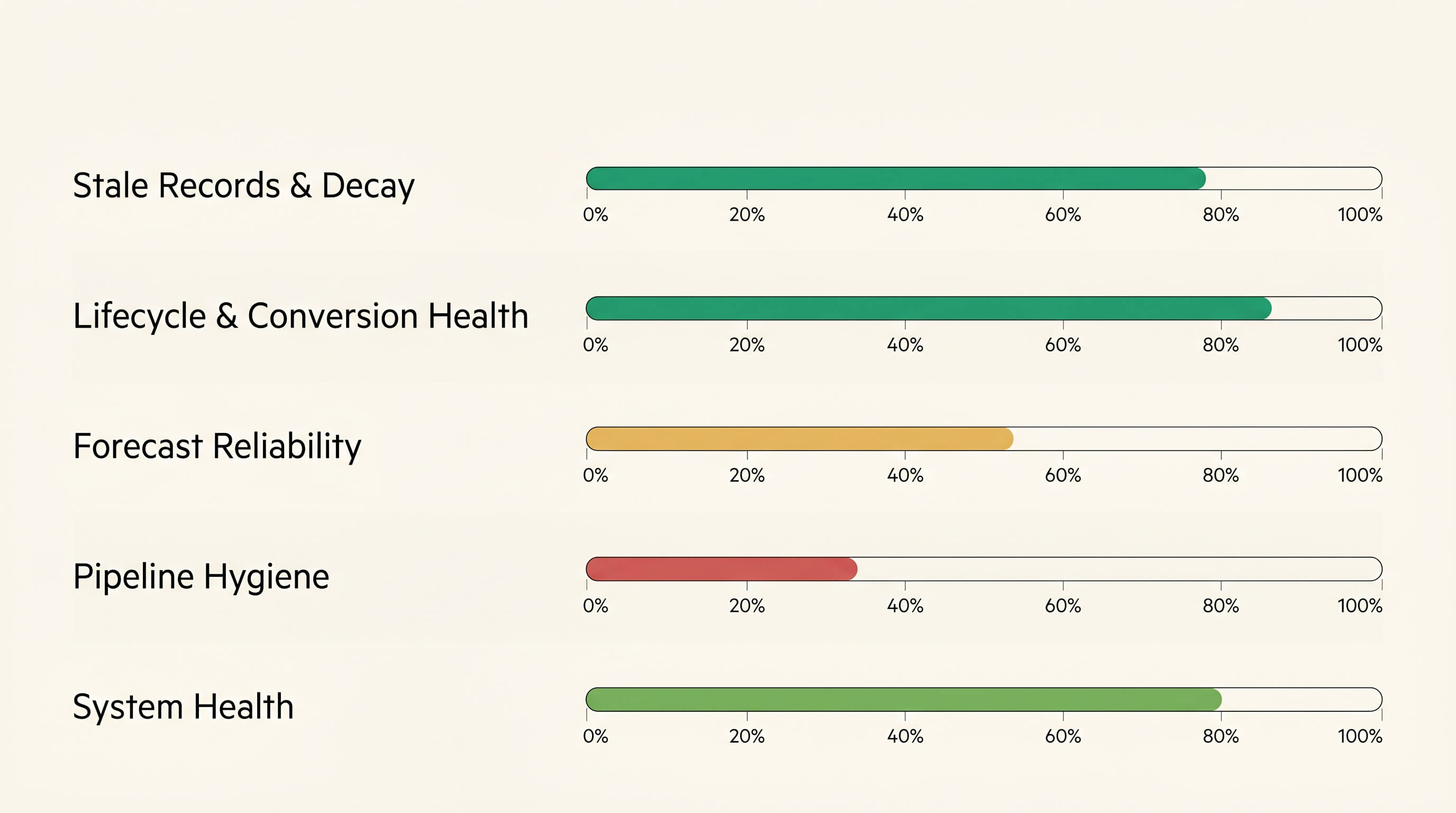
Most HubSpot CRM audit articles are checklists. Tidy duplicates. Archive stale contacts. Fix orphans. Useful, like a tidy desk. They miss the point.
Marketing said 23 leads last week. Sales only saw 16. Both were in HubSpot.
The point of a CRM audit isn't hygiene. It's diagnosis. Where is the portal lying, and why can't marketing and sales defend the same Monday number? Tidiness is a side effect.
What follows is the methodology I use when I audit a HubSpot portal. Five weighted categories. Each scored as a percentage. Rolled into one number. Run it manually below, or run the automated version at audit.pineriverdata.com if you'd rather not spend half a day in filter views.
Why most CRM audits miss the point
The "tidy up the obvious problems" approach catches the surface stuff: duplicates, broken integrations, contacts with no email address. It doesn't catch the structural issues that quietly distort pipeline numbers and erode forecast trust over the course of a year.
A proper audit covers five areas, weighted by how much each one moves revenue:
- Stale records and decay (20%): sender reputation and compliance bleed
- Lifecycle and conversion health (20%): whether your conversion rates are real
- Forecast reliability (25%): whether your forecast number can be trusted
- Pipeline hygiene (15%): invisible pipeline leakage from ownership and routing gaps
- System health (20%): workflow conflicts, technical debt, automation rot Forecast Reliability gets the highest weight because a bad Monday number compounds fastest. Trust takes longer to rebuild than the underlying fields take to fix.
Category 1: Stale records and decay (20%)
What to check: contacts not modified in six months or more, hard-bounced contacts still in active lists, opted-out contacts being touched by workflows or imports.
Why it matters: sender reputation is asymmetric. It degrades faster than it recovers. One stale-list send to a domain full of dormant contacts can hit your inbox placement for 60 to 90 days afterwards. Two of those sends in a row, and you're in a hole that takes a quarter to climb out of.
How to audit manually: build a contact list filtered by last activity date more than 180 days ago, lifecycle stage not Customer (we don't expect customers to have constant inbound activity), and email known. Then a second list: hard-bounce date is known AND opted out is False. Anyone in the second list shouldn't be in your CRM as a contactable record at all.
What healthy looks like: fewer than 15% of your active contact list should be six months stale. Above 25% indicates either an acquisition gap (you're not bringing new people in fast enough) or a missing archival process.
Category 2: Lifecycle and conversion health (20%)
What to check: stage inflation (contacts at lifecycle stages their activity doesn't support), skipped stages, conversion rates that don't reconcile.
Why it matters: every reported conversion rate runs on lifecycle data. If your stages are contaminated, your numbers are too. Pipeline planning, hiring decisions and quota setting all happen against the contaminated numbers.
How to audit manually: three filters to run.
- Contacts at "Opportunity" stage with zero associated open deals.
- Contacts at "Customer" stage with no activity in 12+ months.
- Count of contacts who became SQL in the last 30 days vs. count who became MQL in the same window. SQL should always be smaller. What healthy looks like: stage inflation under 5% across SQL and Opportunity stages combined. The deep-dive on why this happens and how to prevent it lives in the companion piece, HubSpot Lifecycle Stages: The Quirks Everyone Hits.
Category 3: Forecast reliability (25%)
What to check: deals stagnant in stage for 30+ days, open deals past their close date, deals with close-date pushed forward three or more times without stage movement, missing required forecast fields.
Why it matters: this is what your CFO is reading. The forecast number on the board deck is a downstream calculation from these fields. If they're contaminated, every quarter ends with a "surprise" miss.
How to audit manually:
- Filter open deals by deal stage age greater than 30 days. How many of those are still in your forecast?
- Filter open deals by close date in the past. These are inflating your at-risk number.
- Use deal property history to find deals where close date has been edited three or more times in the last 90 days. These are the zombies, usually neither closing nor getting disqualified.
- Check forecast fields (amount, close date, deal stage probability) for completeness on all open deals. What healthy looks like: fewer than 10% of open deals past close date. Fewer than 5% with three or more close-date pushes. Forecast field completeness above 95%.
Category 4: Pipeline hygiene (15%)
What to check: orphan records, deals owned by departed employees, duplicate companies, single-threaded deals, contacts owned by archived users.
Why it matters: the pipeline you can't see is the pipeline that drifts the most. A deal owned by someone who left six months ago doesn't show up in the active rep's pipeline view. The deal still sits in the CRM, still counts in the rolled-up pipeline number, and quietly fails to progress. By the time someone notices, it's stale.
How to audit manually:
- Filter open deals by owner status: list all owners, mark the inactive ones, filter their deals.
- Filter open deals by associated contact count = 1 and amount > £5,000. These are single-threaded high-value deals, one bounced email away from going dark.
- Run HubSpot's native deduplication to surface candidate duplicate companies.
- Filter contacts by associated company count = 0 AND lifecycle stage = Lead/MQL/SQL. These are orphan records that should have a company attached. What healthy looks like: fewer than 2% of active deals owned by archived users. Single-threaded deals representing less than 30% of total open pipeline by value.
Category 5: System health (20%)
What to check: active workflows with no enrollments in 90+ days, workflows with greater than 40% mid-flight drop-off, multiple workflows writing to the same critical field, custom property sprawl.
Why it matters: every piece of unused or contradictory automation is technical debt, and it compounds. The next initiative spends a chunk of its time figuring out what existing workflows might break. "We're not sure" is the answer no one wants to give a board member.
How to audit manually:
- Workflows page: sort active workflows by last-enrolled date. Anything with no enrollments in 90 days is a candidate for deactivation.
- Click into any active workflow → Performance tab → check the funnel chart. Drop-off above 40% mid-flow signals broken downstream actions.
- For each critical field (lifecycle stage, deal stage, owner), search across active workflows for actions that write to it. Multiple writers mean race conditions.
- Properties page: filter custom properties by fill rate. Anything below 5% across your contact base is sprawl. What healthy looks like: fewer than 30% of active workflows in stale or drop-off state. No more than one active workflow writing to any one critical field.
How to score each category
The formula is the same across all five categories:
Score = max(0, 100 − (% affected × severity multiplier))
Each issue type has a severity multiplier. Departed-owner deals are higher severity than slightly stale contacts. Opted-out contacts being re-enrolled in workflows are highest severity, because that one carries legal risk on top of the operational damage. The percent affected is straightforward: affected records over total records. The multiplier amplifies it based on how damaging the issue is.
For example, a portal where 22% of contacts are six months or more stale would score around 67/100 in Stale Records & Decay (22 × 1.5 severity = 33-point deduction). The category scores then roll into a single overall number using the percentages above.
What "healthy" looks like across all five
- 75 and above: rare, usually portals where someone owns the definitions or there is a deliberate hygiene programme
- 50 to 75: a common band for growing B2B teams. Real, structural issues but a fixable system.
- 40 to 50: meaningful gaps. Forecast reliability is usually the worst-scoring category here.
- Below 40: needs immediate triage. The CRM is producing numbers that can't be trusted. The most common surprise I see in client audits: Forecast Reliability is almost always the lowest-scoring category, even in portals that look healthy on the surface. Sales teams hate this finding. They're usually right that it isn't their fault. It's the data and the workflows.
The free PineRiverData CRM audit runs all five categories: 27 individual checks against your live HubSpot portal in about 90 seconds. You get a trust score, your top three fires, and a 30-day fix sequence from your findings. Read-only OAuth. No credit card. Can you trust your HubSpot?
Run the free auditWhat to do with your results
Triage by impact-per-fix. Start with the lowest-scoring weighted category. That's where the most score-points-per-hour-of-fix-work live.
Here's the 30-day sequence I usually run with clients:
- Week 1: Stop the bleed. Reassign deals from departed owners. Suppress hard-bounced contacts. Remove opted-out contacts from active workflows.
- Week 2: Rebuild trust in the numbers. Update past-due close dates, fix close-date manipulation, complete missing forecast fields.
- Week 3: Clean house. Bulk-archive stale contacts, deduplicate companies, run custom property cleanup.
- Week 4: Prevent recurrence. Add demotion workflows, deconflict competing automations, document handoffs. If your team has the bandwidth to drive the fixes, you have everything you need above. If you don't, that's a scoped 90-day sprint to make the HubSpot usable, not a fractional RevOps hire and not another templated rebuild.

Frequently asked questions
What should a HubSpot CRM audit cover?
A proper audit spans five categories: stale records and decay (20% weight), lifecycle and conversion health (20%), forecast reliability (25%), pipeline hygiene (15%), and system health (20%). Together these cover data integrity, forecast trustworthiness, lifecycle accuracy, ownership integrity, and automation health, especially when marketing and sales already disagree on Monday's number. A checklist audit that only looks at duplicates and stale contacts misses the structural issues that actually cost pipeline.
How do you score a HubSpot CRM audit?
Each category is scored 0-100 using the percentage of records affected multiplied by a severity multiplier, capped at 100. The five category scores are then weighted into an overall score. Forecast Reliability carries the highest weight at 25% because forecast errors compound the fastest. Healthy portals score 75 and above; below 40 needs immediate triage.
How long does it take to audit a HubSpot CRM?
Manually, a thorough five-category audit runs to four or eight hours depending on portal size. You'll need to run filtered list views, export data, and cross-reference workflow performance. Automated audits complete in 30 to 90 seconds because they query HubSpot's API directly.
What's the most common HubSpot data quality issue?
Forecast Reliability problems are the most common and the most expensive. Three issues dominate: deals stagnant in stage (no movement in 30+ days but still in pipeline), open deals past their close date, and serial close-date manipulation where reps keep pushing the close date forward without advancing the stage. Together these account for most surprise forecast misses at quarter-end.
How often should I audit my HubSpot CRM?
Quarterly is the right cadence for a full audit. Beyond that, run monthly spot-checks on Forecast Reliability. That's where issues compound fastest. After any major change (new integration, new workflows, sales reorg), run a fresh audit immediately to catch contamination before it spreads.
What HubSpot tier do I need for a CRM audit?
Most audit checks work on any HubSpot tier including Free. The four System Health checks require Professional or higher because the Automation API is gated to those tiers. Audits on Free or Starter portals will run and skip those four with a clear note.
- HubSpot
- CRM Audit
- Data Quality
Can you trust your HubSpot?
Run the free audit, or book a 20-min readout.
Start with a read-only trust score and a prioritised 30-day fix list.